Tap or drag to cast in mobile MOBAs?
Tap to cast when an ability can't miss or the enemy stands still; drag to aim skillshots at moving enemies, because a tap fires at where they are now.
A practical guide for your first mobile MOBA, from Wild Rift to Mobile Legends and Pokémon UNITE: what quick cast and drag-to-aim really do, why auto-aimed skillshots land behind walking enemies, which abilities are safe to tap, and the target-priority settings worth changing. With a practice field where you can cast both ways and watch the hit rate change.
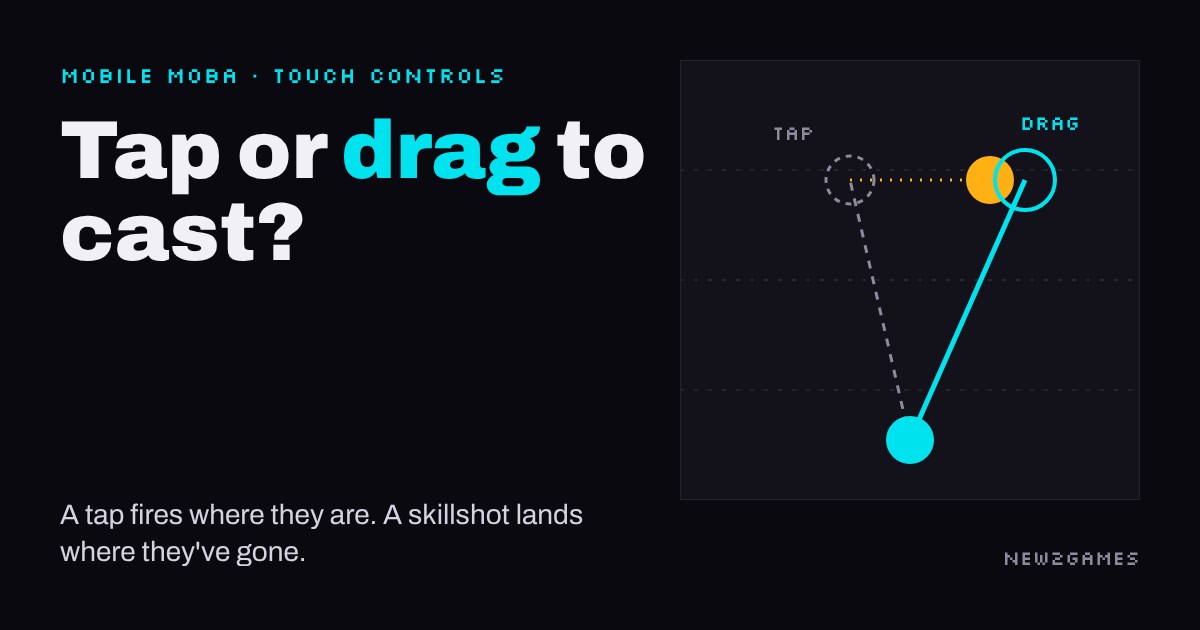
Tap to cast when the ability can't miss or the enemy is standing still. Drag to aim when you're throwing a skillshot at someone who is moving. A tap fires at where the game thinks the enemy is right now. A skillshot needs time to get there, and a walking enemy is somewhere else by the time it arrives. That one gap explains most of the "how did that miss?" moments in your first mobile MOBA.
A MOBA (multiplayer online battle arena) is a team game where two sides of five fight over lanes to destroy each other's base. On phones that means League of Legends: Wild Rift, Mobile Legends: Bang Bang and Pokémon UNITE, among others. Your left thumb moves your character; your right thumb fires abilities. This guide is about that right thumb.
What tapping and dragging actually do
Each ability is a round button on the right of the screen, and every one of these games gives you two ways to use it.
Tap it (often called quick cast) and the game picks a target for you and fires straight away. Which target depends on a target-priority setting, such as the closest enemy or the one with the least health left.
Press, hold and drag and an aim indicator appears on the ground. Slide your thumb to point it, then lift to cast. While you hold, you can usually still cancel; where the cancel spot sits depends on the game and your layout.
Whether tapping is good enough depends on the kind of ability:
- Targeted abilities lock onto a unit and follow it. Once they go off, they hit.
- Area abilities cover a circle or cone. They forgive a bit of error.
- Skillshots fly in a line to a point and hit the first thing in their path, or nothing. These are the ones that miss.
Why a tap misses a moving target
When you tap, the game aims at the enemy's position at that moment. A skillshot then spends some time in the air. If the enemy keeps walking, it lands where they were. The further away they are and the slower the shot, the bigger the gap. Tap-casting can't fix this, because it doesn't know which way they're about to go. You do: you can see them walking.
Dragging costs you a fraction of a second, but it lets you aim at where they're going instead. Shooter players call this leading the target; our guide on leading moving targets goes deeper into how far ahead to aim.
Try it below. The orange dot is an enemy; you are the dot at the bottom. Cast a few times with Tap, then switch to Drag and aim in front of them. "Run 50 taps" fires fifty quick casts in a row so you can see the hit rate without needing good timing.
With a walking enemy, tapped skillshots mostly miss, area abilities land more often because the circle absorbs some of the walking, and targeted abilities always land. Switch the enemy to Standing and the tap hits every time. That's the whole rule in one toggle.
Which abilities to tap and which to drag
| Situation | Use |
|---|---|
| Targeted ability | Tap |
| Area around yourself | Tap |
| Skillshot, enemy stunned or still | Tap |
| Skillshot, enemy moving | Drag |
| Area at range, enemy moving | Drag |
| Dash or escape | Drag |
Dashes deserve their own line. A tapped dash may send you toward the auto-picked target, which is the opposite of what you want when you're running away. Drag it, or look for an option that sends dashes the way you're walking (Wild Rift has one, for example).
Settings worth a look
You don't have to pick one style for everything. Tap what's safe to tap and drag the rest. What helps is making taps pick the right target:
Target priority. Wild Rift lets you choose who taps go for, including a low-health option. Pokémon UNITE has an Opponent Lock-On Priority setting with lowest-remaining-HP choices. Low health is a sensible start: taps then go for the enemy you can actually finish.
Smart Targeting in Mobile Legends. It's off by default. Turned on, you hold the attack or skill button and drag a small targeting dot onto the enemy you want, which is useful in a crowded fight.
Menu names move around between updates, so look under the controls settings in your own game.
How to practise it
Pick one skillshot on your favourite character and drag it every time for a few matches, against bots if your game has them. Aim a step in front of the enemy, in the direction they're walking. If you can't tell which way they'll go, aim at the middle of the gap they're likely to walk through. Then tap everything that can't miss, because the time you save there pays for the aiming.
Expect your hit rate to drop at first. Dragging under pressure feels slow and clumsy for a while, and that is normal: you're swapping a habit that's fast but blind for one that's slower but sees. It usually takes a handful of matches before the drag feels like one motion.
Your other thumb matters too. If your character keeps drifting while you aim, our guide to fixed and floating joysticks covers the movement side. Curious how shooters help controller players aim? Our sister site explains aim assist, which works differently from a MOBA's auto-target.
Quick answers
Is quick cast bad for beginners?
No: it's the right choice for targeted and close-range area abilities, and only costs you on skillshots at moving enemies.
Why does my auto-aimed skillshot miss?
It aims at where the enemy is when you tap, and they keep walking while the shot is in the air.
Should I set target priority to lowest health?
It's a good default, because your taps then go for the enemy you can finish rather than the one who happens to be nearest.
Next step: in your next match, drag your character's main skillshot every single time, and tap everything else.