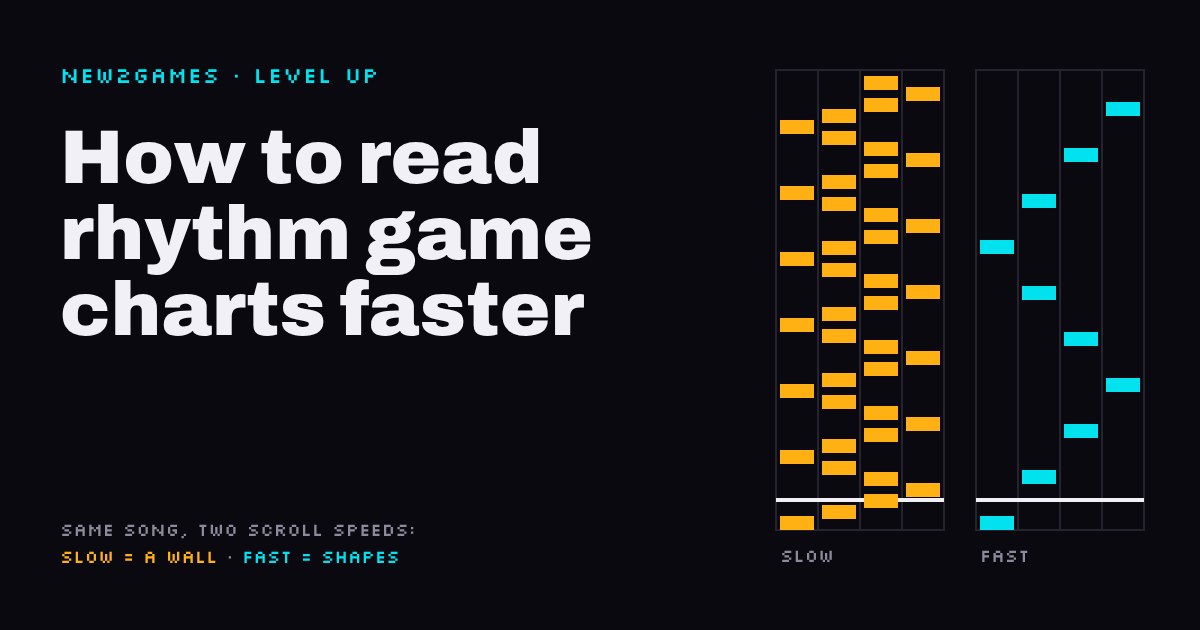
Raise the scroll speed, look up the lane and read notes as shapes. Busy charts are usually too crowded for your eyes, not too fast for your hands.
Faster scrolling spreads notes apart but gives you less warning, so the right speed is a trade-off you can feel in our scroll-speed toy. Then learn to judge speed by how long notes stay on screen, where to rest your eyes, the four shapes that show up in almost every chart, and how to practise reading rather than memorising songs.
▶ Interactive · How to read rhythm game charts faster
To read rhythm game charts faster, turn the scroll speed up more than feels comfortable, look higher up the lane instead of staring at the hit line, and read notes in groups as shapes rather than one at a time. If dense sections look like a solid wall of notes, the chart is usually not too hard for your hands. It is too crowded for your eyes.
Most rhythm games start you on a slow scroll speed because it looks friendly. On easy songs it is. On busier songs it quietly holds you back.
Why slow scrolling makes busy songs harder
On this site we describe difficulty by where it comes from instead of a single score. Rhythm games are almost pure Execution: timing and precision. But there are two halves to it. Your hands have to hit on time, and before that your eyes have to read the chart: work out which notes are coming, in which lanes, in what order. Sight-reading, playing a chart you have never seen, is mostly that second half.
Scroll speed controls both halves at once, and they pull in opposite directions. The gap you see between two notes is the scroll speed multiplied by the time between them. The time a note spends on screen is the length of the lane divided by the scroll speed. Double the speed and every gap doubles, but each note is visible for half as long.
Slow speeds give you lots of warning but squash fast notes together until they overlap. Fast speeds spread them out into readable shapes but give you less warning. osu! shows the same trade-off in a different form: its approach rate setting decides how early a circle appears. According to the osu! wiki, a circle at approach rate 5 appears 1,200 ms before you hit it, and at approach rate 9 only 600 ms before. The wiki also warns that low approach rates can fill the screen with an overwhelming number of objects. Try the trade-off yourself:
Start at 1x and 180 BPM (beats per minute) with the stairs pattern: the notes almost touch, and you can't easily tell which one comes first. Slide the speed up and the same stairs open out into a clean diagonal. Push it to the top and the shape stays clear, but each note flashes past. Switch to 120 BPM and the same speed suddenly feels roomy. That is why a speed setting that felt right on one song can feel wrong on the next.
Pick your speed by time, not by the number
Every game names the setting differently. Theatrhythm Final Bar Line calls it Trigger Speed. Project Sekai has Note Speed under its show options, where, as SEGA's help page puts it, a lower number means slower notes. In beatmania IIDX it is Hi-Speed.
The more useful number is how long a note stays visible, because that stays meaningful from song to song. IIDX-style players track it as the "green number". The beatoraja English guide explains it: in IIDX it is counted in frames at 600 per second, so a green number of 300 is about 500 ms on screen. The guide puts most players somewhere around 270–310, and its advice is to find a visible time you like and keep it fixed. Most games don't show you that number, so here is a simple way to find your speed:
Pick a song you can mostly clear, but whose busy parts blur.
Raise the speed one step. Play. Repeat until the notes feel slightly too fast.
Play three different songs at that speed before you judge it. Your first few songs at a new speed will feel worse; that's normal.
If it still feels like a flicker after three songs, drop back one step. That is your speed for now. As you improve, you'll keep nudging it up.
Look up the lane, not at the hit line
Beginners often stare at the hit line, where notes are judged. By then it's too late to plan. A better habit is to rest your eyes somewhere in the upper part of the lane, the shaded "read here" band in the toy above, and let the hit line sit at the edge of your vision. You read the next group while your hands play this one, like reading a few words ahead when reading aloud.
Read shapes, not single notes
Fluent readers don't see sixteen separate notes. They see four shapes. A handful of patterns come up in almost every lane-based rhythm game:
Stairs: notes running across the lanes one after another, like a staircase.
Trills: two lanes alternating quickly, left-right-left-right.
Jacks: the same lane hit several times in a row.
Jumps: two notes that land together and are hit at the same moment.
Once you can name a shape, you can play it as one movement instead of a string of separate decisions. Higher scroll speed helps here too: shapes are easier to spot when notes don't overlap.
Practise reading on purpose
Reading improves fastest on songs a little below your limit, where your hands are comfortable and your eyes can do the work. Some games build in tools for the hard parts. Taiko no Tatsujin: Rhythm Festival has a practice mode for replaying sections of a song as often as you like, says Bandai Namco, and Gaming Bible's guide adds that it can slow the notes down for a hard passage. Learn the shape slowly, then speed it back up.
One habit to watch out for, a warning rather than a skill: memorising a song instead of reading it. Replaying one chart until you know it by heart clears that song, but it doesn't carry over to the next one. Mix in charts you haven't played, so your eyes keep practising.
If the game calls you early or late on notes you clearly saw, that's a timing delay, not reading. Our guide on why rhythm games feel off on your phone covers calibration.
Quick answers
Does a higher scroll speed make a rhythm game harder?
Not usually for busy songs: it spreads the notes apart so patterns are easier to read, at the cost of less warning per note.
What scroll speed should a beginner use?
There's no single right number; raise it until notes feel slightly too fast, play three songs, and drop one step if it still feels like a flicker.
Where should I look when playing a rhythm game?
A little up the lane from the hit line, so you see the next group of notes while you play the current one.
Your next step: open the rhythm game you play most, raise the note speed by one step, and play three songs you know before deciding whether to keep it.
Loadout · gear used
Affiliate links, marked sponsored. We may earn a commission at no extra cost to you. Examples that match this guide, not tested reviews. Prices checked 28 Nov; every shop and live prices are on each product page.