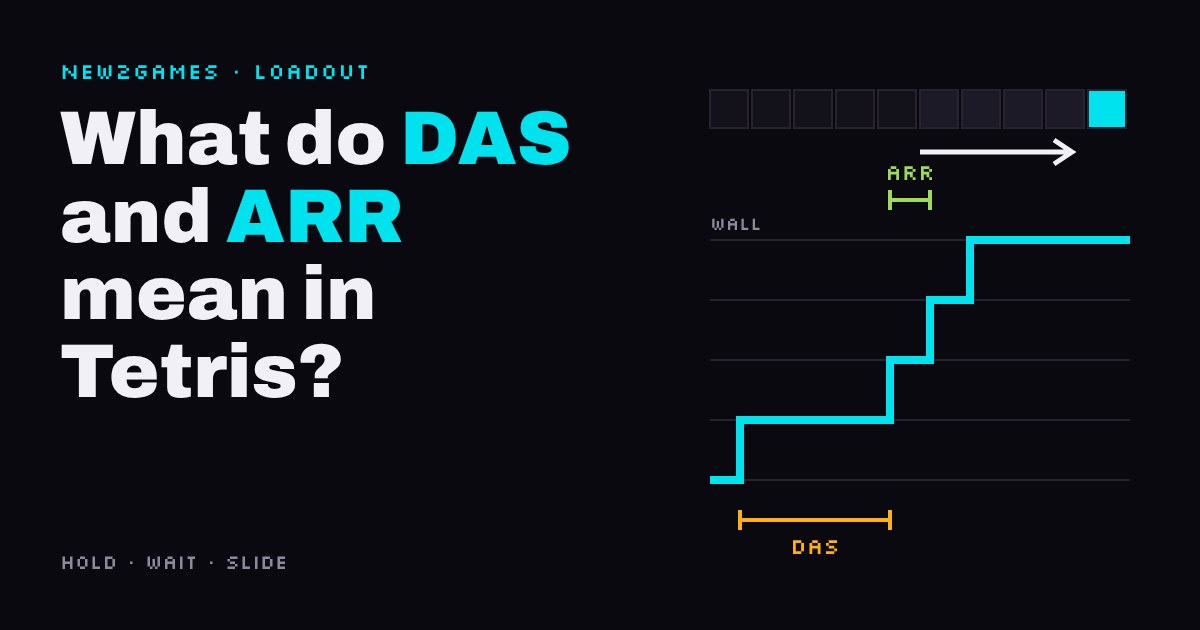
DAS is how long you hold left or right before a Tetris piece slides on its own; ARR is how fast it slides after that. Lower ARR first, then DAS.
This guide explains both settings with an interactive you can drag, shows why NES Tetris players learned to hypertap, and covers where you can change handling (free browser games like TETR.IO) and where you can't. It ends with community starting values and a one-change-per-session method for tuning them.
▶ Interactive · What do DAS and ARR mean in Tetris?
DAS (delayed auto shift) is how long you hold left or right before a Tetris piece starts sliding on its own; ARR (auto repeat rate) is how fast it slides once it does. Lower numbers mean faster on both. If your game lets you change them, a sensible first step is to lower ARR and leave DAS alone until quick taps stop turning into accidental slides. Some console versions don't offer these settings at all, and that's fine: the skill underneath is the same.
What the two numbers actually do
Press right once and the piece moves one column. Keep holding and nothing more happens for a moment: that wait is DAS. When it runs out, the game starts moving the piece for you, one column every so often: that interval is ARR. Both are measured in milliseconds or in frames, the single pictures a game draws per second (at 60 frames a second, one frame is about 17 ms; there is more on frames in why you can't react to fast fighting game moves).
The two numbers pull against each other. A short DAS gets pieces to the wall sooner, but it also means a tap you meant as "one column" can last long enough to start the slide. A short ARR has almost no downside once the slide has started, because you only hold when you want the piece to go a long way. That's why ARR is the safer one to lower first.
Why old Tetris players tap so fast
The original NES Tetris (1989) has fixed handling that you can't change. According to its Wikipedia entry and the Hard Drop wiki, a press moves the piece one column, then the game waits 16 frames, then moves it one column every 6 frames, about 10 columns a second. Pick the NES preset above and watch how long the piece takes to reach the wall.
At higher levels, pieces fall faster than that slide can carry them across the board. So top players learned hypertapping: pressing the d-pad by hand more than 10 times a second, beating the game's own auto-repeat. Later came rolling, where the thumb rests on the d-pad and the fingers of the other hand drum the back of the controller. That's a whole technique built around a setting you can't change. Modern block-stacking games let you change it instead.
Where you can change it
Free online games such as TETR.IO, which runs in a browser, have a handling menu with DAS, ARR and a third setting, SDF (soft drop factor): how many times faster than normal a piece falls while you hold down. TETR.IO's own FAQ explains that ARR 0 is instant: once DAS runs out, the piece jumps straight to the wall. It also lists DCD (DAS cut delay), a short extra pause for when you rotate or drop a piece that is pressed against the wall while still holding the direction; you can ignore it while you learn.
Console releases are often stricter. In 2022 a developer of Tetris Effect: Connected said on its Steam forum that movement, including DAS, ARR and soft drop speed, is fixed, with some speed options only in local and friend lobbies. We found no handling menu in Puyo Puyo Tetris 2 either, in the sources we checked. Both are still good places to learn: you build the skill around one fixed feel, as NES players did.
Starting values, and how to change them
One community guide, the TetroWars handling page, suggests these steps. Treat them as a starting point, not a target.
Stage
DAS / ARR / SDF
Beginner
167 ms / 33 ms / 20x
Intermediate
120 ms / 15 ms / 30x
Advanced
100 ms / 0 / instant
The method matters more than the numbers:
Write down your current values before you touch anything, so you can go back.
Change one number per session. If you change two, you won't know which one helped.
Lower ARR first. It speeds up every long move and rarely causes mistakes.
Lower DAS only when you're waiting on it, and raise it again if one-column taps start sliding. Misplaced pieces from overshooting (players call them misdrops) are the sign DAS is too short for your hands.
Handling is pure execution difficulty, the reflexes-and-precision kind: it changes how quickly and cleanly your hands turn a decision into a placed piece. It doesn't help you decide where the piece should go. If you're losing because the stack is a mess, settings won't fix that; if you know where every piece goes but can't get it there in time, they might.
Quick answers
Is lower DAS always better?
No: below a point, quick taps start sliding pieces too far, so the best DAS is the lowest one your taps can live with.
What does ARR 0 mean?
The piece jumps to the wall the moment DAS runs out, with no visible slide.
Can I change DAS in Tetris Effect: Connected?
Not in the normal modes, according to a 2022 developer post; some multiplayer lobbies have speed options.
Next step: open the handling menu in whichever game you play, write down the numbers, and lower ARR one step. Play a few rounds before you change anything else.
Watch it done
3 videos from other creators on this, picked and annotated by us.
Affiliate links, marked sponsored. We may earn a commission at no extra cost to you. Examples that match this guide, not tested reviews. Prices checked 15 Nov; every shop and live prices are on each product page.
The console game the article uses as its example of fixed handling: you learn one set feel, the way NES players did, with some speed options in local and friend lobbies.