New to fighting games? Start Street Fighter 6 on Modern controls: one-button specials cost 20% damage, but win whenever your motion inputs fail more than 1 in 5.
This guide explains what Modern changes (the SP and assist buttons), why 80% is the break-even point, what else Modern costs (missing moves, shorter combos), and when Classic is the better pick, including for skill transfer to other fighting games. Practise a quarter-circle on the pad and see which scheme wins for you.
▶ Interactive · Modern or Classic controls in Street Fighter 6?
If Street Fighter 6 is your first fighting game, start on Modern controls. Modern lets you fire a special move with one button and a direction instead of a joystick motion, and in exchange those one-button specials and supers deal 20% less damage. That trade is worth it for as long as your motion inputs fail more than about one time in five when it matters. Switch to Classic later if you want the full move list, or the input habits that carry over to other fighting games.
What changes when you pick Modern
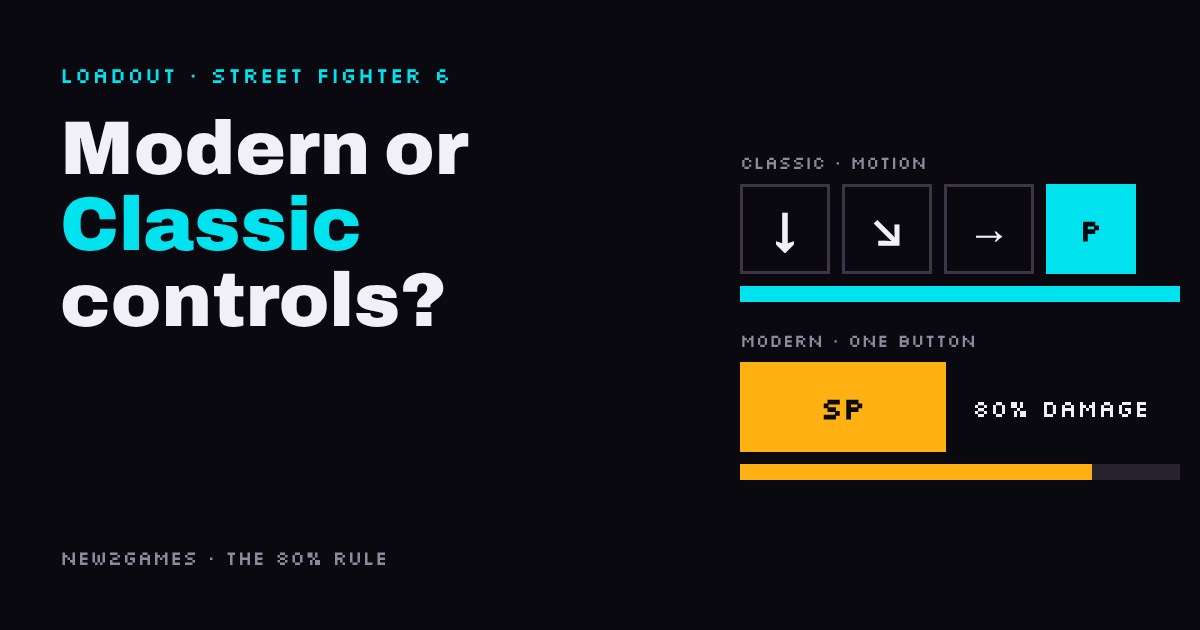
Classic is the traditional layout: six attack buttons (light, medium and heavy punch, and the same three kicks), with special moves done by a motion input, a short joystick or d-pad gesture followed by a button. The fireball, for example, is down, down-forward, forward, then punch, written as a "quarter-circle".
You choose the scheme on the character select screen, and you can change it before any match. Modern swaps that for three attack buttons (light, medium, heavy), a special (SP) button and an assist button. Press SP alone or with a direction and you get a special move, no gesture needed. Hold assist and press an attack button repeatedly and the game strings together a ready-made combo for you. Modern is allowed in casual and ranked online matches; the third option, Dynamic, picks moves for you and only works offline.
The 80% rule
The price of the SP button is the damage cut on the specials and supers it performs. So the question for a newcomer is simple: what is a motion input worth if it doesn't come out? A dropped quarter-circle usually gives you a plain punch instead, often at the worst moment. On average, a move that deals full damage 70% of the time is worth less than one that deals 80% damage every time. The break-even point is exactly 80%: below it, the SP button wins.
Tap the pad ten times at speed and the slider jumps to your own hit rate. When you are calm, a quarter-circle is not hard to land. The real test is doing it at the exact moment it is needed, such as an anti-air special the instant someone jumps at you. That is where a one-button special earns its damage cut.
There is a middle path, too: on Modern you can still do the motion yourself for many specials, and those count as full damage. So a Modern player can use SP when it must come out and the motion when there is time.
What Modern costs beyond damage
The 20% is the visible cost. The other one matters more as you improve:
Fewer moves. Three attack buttons can't hold six buttons' worth of normal attacks, so every character loses some. Ryu on Modern, for example, has no standing heavy kick in the breakdowns we checked, a move Classic players use to punish mistakes. You also lose the choice between light, medium and heavy versions of many specials, and with fewer moves some of the best combo routes don't exist, so the damage gap in a full combo can be bigger than 20%.
Then there is the strongest argument for Classic, and it is about skill transfer. Quarter-circles and the "dragon punch" motion (forward, down, down-forward) are the shared language of most traditional 2D fighting games. Learn them in Street Fighter 6 and they carry over; the SP button does not. Our view: in your first month this matters less than it sounds, because the skills that decide most beginner matches (blocking, spacing, patience) carry over from either scheme. But if you already know you want to play several fighting games, starting on Classic is a fair choice.
Which kind of difficulty it removes
For a newcomer, Street Fighter 6 is hard in two ways: Execution, getting your hands to do the move at the right moment, and Competition, an opponent who is trying to read you. Modern cuts the input part of Execution. It does nothing about Competition, and it doesn't make fast moves easier to react to (our guide on why you can't react to fast fighting game moves covers that).
The same goes for hardware: a regular pad works for both schemes. An arcade stick is a matter of taste, not a requirement for either.
Who should pick which
Pick Modern if this is your first fighting game, you mostly want to play and win a few matches, or your motion inputs still come out wrong under pressure.
Pick Classic if you already land quarter-circles reliably, you want every move your character has, or you plan to play other traditional fighting games. If you are unsure, start on Modern: switching later is one menu option, not a fresh start.
Next step: open Street Fighter 6, pick Modern for your character, and spend ten minutes in Training mode using SP for the anti-air special only. When that feels automatic, try the motion version instead.
Quick answers
Do Modern controls do less damage in Street Fighter 6?
Specials and supers done with the SP button deal 20% less; doing the motion yourself, where Modern allows it, avoids the cut.
Can you play ranked with Modern controls?
Yes, Modern is allowed in casual and ranked online matches; only Dynamic is limited to offline play.
Should I learn Classic eventually?
Only if you want the full move list or plan to play other traditional fighting games; plenty of players stay on Modern.
Loadout · gear used
Affiliate links, marked sponsored. We may earn a commission at no extra cost to you. Examples that match this guide, not tested reviews. Prices checked 30 Oct; every shop and live prices are on each product page.
The game this guide is about, on Switch 2, where Classic, Modern and Dynamic are all set up for Joy-Con play. Pick Modern at character select to start.